分类: C/C++
2008-02-25 15:38:17
处理用户输入
正如您在第一章所看到的,在XNA中捕捉用户的键盘和Gamepad输入是非常简单的,单单为它写一个单元测试有点夸张了。您已经知道它是如何工作的,而且也只是想测试一下控制球拍的运动,所以没有必要写一个新的单元测试,完全可以使用前面的TestGameSprites,或许可以把它重新命名为TestSingleplayerGame。单元测试的内容还是一样的,您只需在PongGame的Update方法中修改对输入的处理并更新球拍的位置:
 // Get current gamepad and keyboard statesgamePad = GamePad.GetState(PlayerIndex.One);gamePad2 = GamePad.GetState(PlayerIndex.Two);keyboard = Keyboard.GetState();gamePadUp = gamePad.DPad.Up == ButtonState.Pressed || gamePad.ThumbSticks.Left.Y > 0.5f;gamePadDown = gamePad.DPad.Down == ButtonState.Pressed || gamePad.ThumbSticks.Left.Y < -0.5f;gamePad2Up = gamePad2.DPad.Up == ButtonState.Pressed || gamePad2.ThumbSticks.Left.Y > 0.5f;gamePad2Down = gamePad2.DPad.Down == ButtonState.Pressed || gamePad2.ThumbSticks.Left.Y < -0.5f;// Move half way across the screen each secondfloat moveFactorPerSecond = 0.5f * (float)gameTime.ElapsedRealTime.TotalMilliseconds / 1000.0f;// Move up and down if we press the cursor or gamepad keys.if (gamePadUp || keyboard.IsKeyDown(Keys.Up)) rightPaddlePosition -= moveFactorPerSecond;if (gamePadDown || keyboard.IsKeyDown(Keys.Down)) rightPaddlePosition += moveFactorPerSecond;// Second player is either controlled by player 2 or by the computerif (multiplayer)

 {
{ // Move up and down if we press the cursor or gamepad keys. if (gamePad2Up || keyboard.IsKeyDown(Keys.W)) leftPaddlePosition -= moveFactorPerSecond; if (gamePad2Down || keyboard.IsKeyDown(Keys.S) || keyboard.IsKeyDown(Keys.O)) leftPaddlePosition += moveFactorPerSecond;
 } // ifelse{ // Just let the computer follow the ball position float computerChange = ComputerPaddleSpeed * moveFactorPerSecond; if (leftPaddlePosition > ballPosition.Y + computerChange) leftPaddlePosition -= computerChange; else if (leftPaddlePosition < ballPosition.Y - computerChange) leftPaddlePosition += computerChange;} // else// Make sure paddles stay between 0 and 1if (leftPaddlePosition < 0) leftPaddlePosition = 0;if (leftPaddlePosition > 1) leftPaddlePosition = 1;if (rightPaddlePosition < 0) rightPaddlePosition = 0;if (rightPaddlePosition > 1) rightPaddlePosition = 1;/**//// /// Ball speed multiplicator, this is how much screen space the ball will/// travel each second./// const float BallSpeedMultiplicator = 0.5f;/**//// /// Computer paddle speed. If the ball moves faster up or down than this,/// the computer paddle can't keep up and finally we will win./// const float ComputerPaddleSpeed = 0.5f;//25f;/**//// /// Game modes/// enum GameMode{ Menu, Game, GameOver,} // enum GameModeGamePadState gamePad, gamePad2;KeyboardState keyboard;bool gamePadUp = false, gamePadDown = false, gamePad2Up = false, gamePad2Down = false;/**//// /// Are we playing a multiplayer game? If this is false, the computer/// controls the left paddle./// bool multiplayer = false;/**//// /// Game mode we are currently in. Very simple game flow./// GameMode gameMode = GameMode.Menu;/**//// /// Currently selected menu item./// int currentMenuItem = 0;// Show screen depending on our current screen modeif (gameMode == GameMode.Menu){ // Show menu RenderSprite(menuTexture, 512-XnaPongLogoRect.Width/2, 150, XnaPongLogoRect); RenderSprite(menuTexture, 512-MenuSingleplayerRect.Width/2, 300, MenuSingleplayerRect, currentMenuItem == 0 ? Color.Orange : Color.White); RenderSprite(menuTexture, 512-MenuMultiplayerRect.Width/2, 350, MenuMultiplayerRect, currentMenuItem == 1 ? Color.Orange : Color.White); RenderSprite(menuTexture, 512-MenuExitRect.Width/2, 400, MenuExitRect, currentMenuItem == 2 ? Color.Orange : Color.White); // Note: Usually input should be handled in Update, but I really think // it is better to have to closely together with the UI code here! if ((keyboard.IsKeyDown(Keys.Down) || gamePadDown) && remDownPressed == false)
 { currentMenuItem = (currentMenuItem + 1)%3; soundBank.PlayCue("PongBallHit");
 } // else if else if ((keyboard.IsKeyDown(Keys.Up) || gamePadUp) && remUpPressed == false) { currentMenuItem = (currentMenuItem + 2)%3; soundBank.PlayCue("PongBallHit"); } // else if else if ((keyboard.IsKeyDown(Keys.Space) || keyboard.IsKeyDown(Keys.LeftControl) || keyboard.IsKeyDown(Keys.RightControl) || keyboard.IsKeyDown(Keys.Enter) || gamePad.Buttons.A == ButtonState.Pressed || gamePad.Buttons.Start == ButtonState.Pressed || // Back or Escape exits our game on Xbox 360 and Windows keyboard.IsKeyDown(Keys.Escape) || gamePad.Buttons.Back == ButtonState.Pressed) && remSpaceOrStartPressed == false && remEscOrBackPressed == false) { // Quit app. if (currentMenuItem == 2 || keyboard.IsKeyDown(Keys.Escape) || gamePad.Buttons.Back == ButtonState.Pressed) { this.Exit(); } // if else { // Start game …handle game, etc…./**//// /// Start new ball at the beginning of each game and when a ball is lost./// public void StartNewBall(){ ballPosition = new Vector2(0.5f, 0.5f); Random rnd = new Random((int)DateTime.Now.Ticks); int direction = rnd.Next(4); ballSpeedVector = direction == 0 ? new Vector2(1, 0.8f) : direction == 1 ? new Vector2(1, -0.8f) : direction == 2 ? new Vector2(-1, 0.8f) : new Vector2(-1, -0.8f);} // StartNewBall()// Update ball position and bounce off the bordersballPosition += ballSpeedVector * moveFactorPerSecond * BallSpeedMultiplicator;
 public static void TestBallCollisions(){ StartTest( delegate { // Make sure we are in the game and in singleplayer mode testGame.gameMode = GameMode.Game; testGame.multiplayer = false; testGame.Window.Title = "Xna Pong - Press 1-5 to start collision tests"; // Start specific collision scene based on the user input. if (testGame.keyboard.IsKeyDown(Keys.D1)) { // First test, just collide with screen border testGame.ballPosition = new Vector2(0.6f, 0.9f); testGame.ballSpeedVector = new Vector2(1, 1); } // if else if (testGame.keyboard.IsKeyDown(Keys.D2)) { // Second test, straight on collision with right paddle testGame.ballPosition = new Vector2(0.9f, 0.6f); testGame.ballSpeedVector = new Vector2(1, 1); testGame.rightPaddlePosition = 0.7f; } // if else if (testGame.keyboard.IsKeyDown(Keys.D3)) { // Thrid test, straight on collision with left paddle testGame.ballPosition = new Vector2(0.1f, 0.4f); testGame.ballSpeedVector = new Vector2(-1, -0.5f); testGame.leftPaddlePosition = 0.35f; } // if else if (testGame.keyboard.IsKeyDown(Keys.D4)) { // Advanced test to check if we hit the edge of the right paddle testGame.ballPosition = new Vector2(0.9f, 0.4f); testGame.ballSpeedVector = new Vector2(1, -0.5f); testGame.rightPaddlePosition = 0.29f; } // if else if (testGame.keyboard.IsKeyDown(Keys.D5)) { // Advanced test to check if we hit the edge of the right paddle testGame.ballPosition = new Vector2(0.9f, 0.4f); testGame.ballSpeedVector = new Vector2(1, -0.5f); testGame.rightPaddlePosition = 0.42f; } // if // Show lives testGame.ShowLives(); // Ball in center testGame.RenderBall(); // Render both paddles testGame.RenderPaddles(); });} // TestBallCollisions()// Check top and bottom screen borderif (ballPosition.Y < 0 || ballPosition.Y > 1){ ballSpeedVector.Y = -ballSpeedVector.Y; // Move ball back into screen space if (ballPosition.Y < 0) ballPosition.Y = 0; if (ballPosition.Y > 1) ballPosition.Y = 1;} // if// Check for collisions with the paddles// Construct bounding boxes to use the intersection helper method.Vector2 ballSize = new Vector2( GameBallRect.Width / 1024.0f, GameBallRect.Height / 768.0f);BoundingBox ballBox = new BoundingBox( new Vector3(ballPosition.X-ballSize.X/2, ballPosition.Y-ballSize.Y/2, 0), new Vector3(ballPosition.X+ballSize.X/2, ballPosition.Y+ballSize.Y/2, 0));Vector2 paddleSize = new Vector2( GameRedPaddleRect.Width / 1024.0f, GameRedPaddleRect.Height / 768.0f);BoundingBox leftPaddleBox = new BoundingBox( new Vector3(-paddleSize.X/2, leftPaddlePosition-paddleSize.Y/2, 0), new Vector3(+paddleSize.X/2, leftPaddlePosition+paddleSize.Y/2, 0));BoundingBox rightPaddleBox = new BoundingBox( new Vector3(1-paddleSize.X/2, rightPaddlePosition-paddleSize.Y/2, 0), new Vector3(1+paddleSize.X/2, rightPaddlePosition+paddleSize.Y/2, 0));// Ball hit left paddle?if (ballBox.Intersects(leftPaddleBox)){ // Bounce of the paddle (always make positive) ballSpeedVector.X = Math.Abs(ballSpeedVector.X); // Increase speed a little ballSpeedVector *= 1.05f; // Did we hit the edges of the paddle? if (ballBox.Intersects(new BoundingBox( new Vector3(leftPaddleBox.Min.X-0.01f, leftPaddleBox.Min.Y-0.01f, 0), new Vector3(leftPaddleBox.Min.X+0.01f, leftPaddleBox.Min.Y+0.01f, 0)))) // Bounce of at a more difficult angle for the other player ballSpeedVector.Y = -2; else if (ballBox.Intersects(new BoundingBox( new Vector3(leftPaddleBox.Min.X-0.01f, leftPaddleBox.Max.Y-0.01f, 0), new Vector3(leftPaddleBox.Min.X+0.01f, leftPaddleBox.Max.Y+0.01f, 0)))) // Bounce of at a more difficult angle for the other player ballSpeedVector.Y = +2; // Move away from the paddle ballPosition.X += moveFactorPerSecond * BallSpeedMultiplicator;} // if// Ball lost?if (ballPosition.X < -0.065f){ // Play sound soundBank.PlayCue("PongBallLost"); // Reduce number of lives leftPlayerLives--; // Start new ball StartNewBall();} // ifelse if (ballPosition.X > 1.065f){ // Play sound soundBank.PlayCue("PongBallLost"); // Reduce number of lives rightPlayerLives--; // Start new ball StartNewBall();} // if// If either player has no more lives, the other one has won!if (gameMode == GameMode.Game && (leftPlayerLives == 0 || rightPlayerLives == 0)){ gameMode = GameMode.GameOver; StopBall();} // if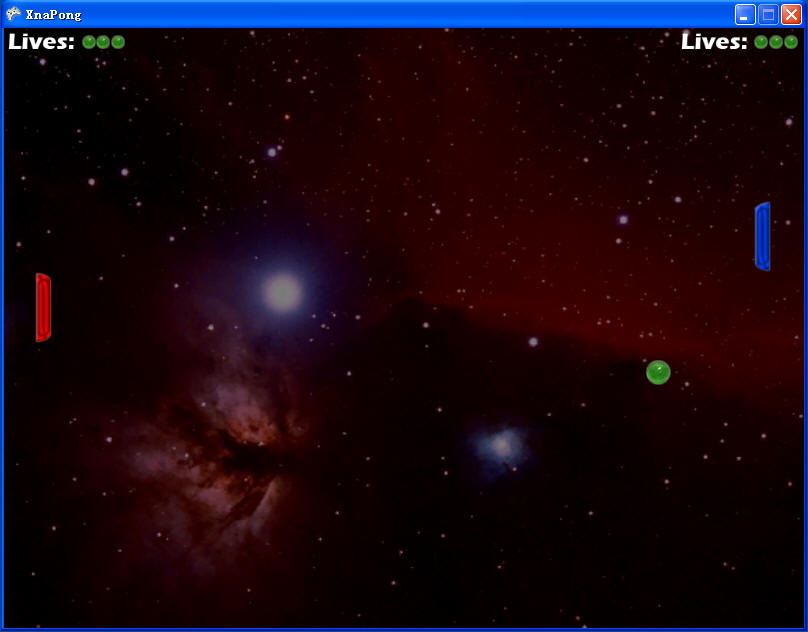

 public static void TestSounds(){ StartTest( delegate { if (testGame.keyboard.IsKeyDown(Keys.Space)) testGame.soundBank.PlayCue("PongBallHit"); if (testGame.keyboard.IsKeyDown(Keys.LeftControl)) testGame.soundBank.PlayCue("PongBallLost"); });} // TestSounds()// Ball lost?if (ballPosition.X < -0.065f){ // Play sound soundBank.PlayCue("PongBallLost"); // Reduce number of lives leftPlayerLives--; // Start new ball StartNewBall();} // ifelse if (ballPosition.X > 1.065f){ // Play sound soundBank.PlayCue("PongBallLost"); // Reduce number of lives rightPlayerLives--; // Start new ball StartNewBall();} // if